AI Automation
AI Receptionist for Small Business: Complete 2026 Guide
Learn how an AI receptionist for small business answers calls, qualifies leads, books appointments, routes urgent requests and connects with your CRM.
By Tayyiba Suleman - Published August 4, 2026 - Updated August 4, 2026 - 19 min read
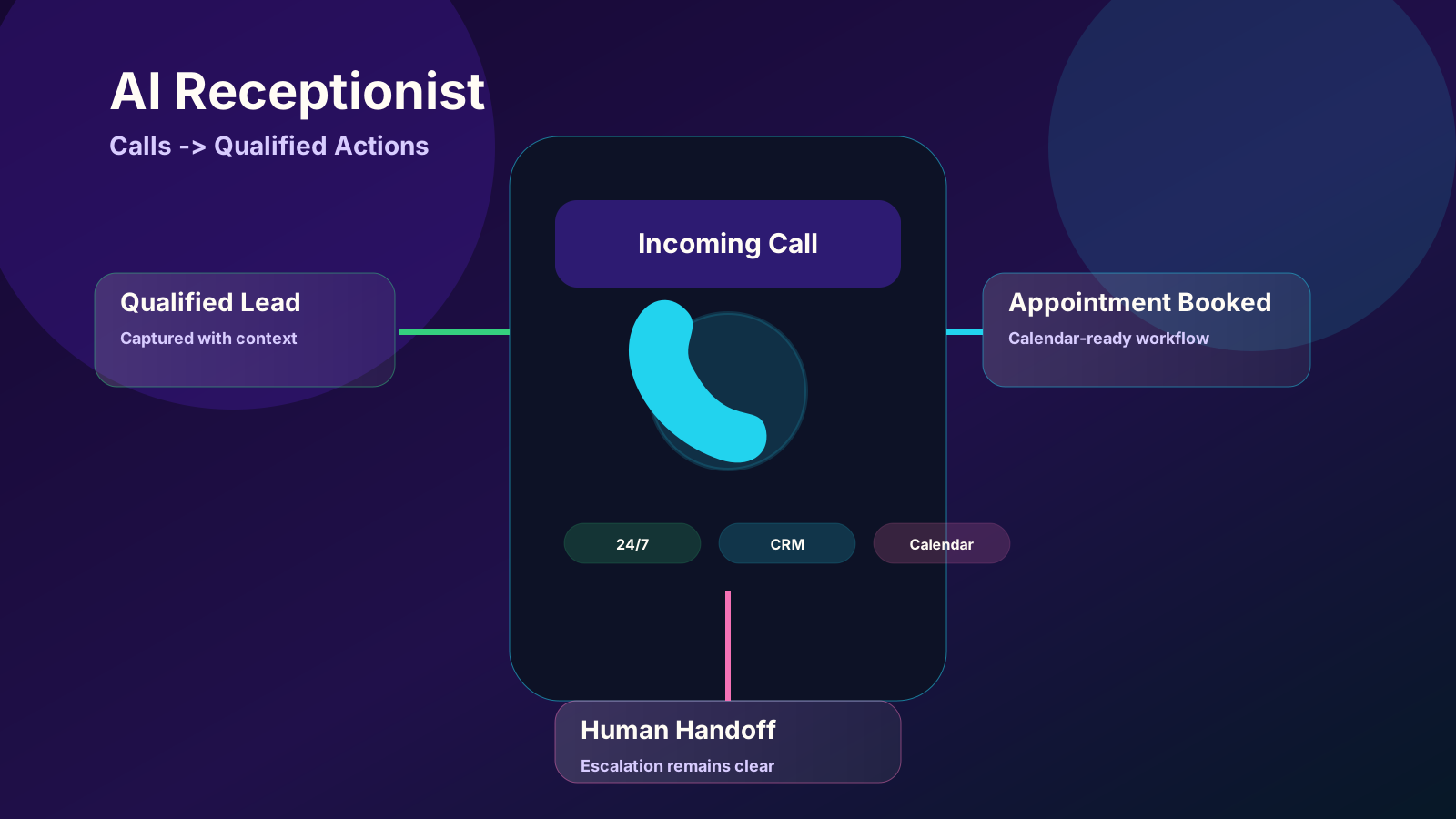
A practical guide to AI receptionists for small businesses, including how they work, costs, use cases, setup, risks and performance metrics.
Reader outcome: Evaluate an AI receptionist for small business call handling, booking, lead routing and human handoff. This article is educational, uses safe CurrentReach AI-owned visuals, and labels illustrative examples where they appear.
How this guide was prepared
This article is written for CurrentReach AI readers using service-planning experience, website implementation patterns, SEO checks, automation workflow review, and practical measurement considerations. It is not copied from a third-party report or generated from private account data.
Mapped around triggers, owner review, failure handling and data quality.
Keeps human approval in sensitive customer-facing steps.
Connects workflow ideas to measurable lead and follow-up outcomes.
A customer calls while you are driving to a job, helping another client, working in a treatment room or managing a busy front desk. Nobody answers. The caller does not always leave a voicemail. They may simply call the next business on the search results page.
An AI receptionist for small business is designed to reduce that gap. It can answer incoming calls, understand why someone is calling, respond to approved questions, collect contact details, qualify an inquiry, book an appointment and transfer urgent or high-value calls to a person.
The goal is not to remove people from every customer conversation. A well-designed system handles repetitive front-desk work while keeping humans responsible for exceptions, sensitive questions, unusual requests and important decisions.
Quick answer: An AI receptionist is a voice-based automation system that answers business calls using natural language. It can provide approved information, capture leads, schedule appointments, route calls, send summaries and update connected business tools. It works best when its scope, escalation rules and data access are carefully controlled.
What Is an AI Receptionist for Small Business?
An AI receptionist is a software-based phone assistant that uses speech recognition, language processing, business rules and integrations to manage inbound calls.
Unlike a traditional phone menu that asks callers to "press one for sales," an AI phone receptionist can allow the caller to explain the reason for the call in normal language. The system identifies the caller's intent and follows an approved path.
For example, a caller may say:
- "I need to book a consultation next week."
- "Do you provide emergency repair services?"
- "Can I reschedule my appointment?"
- "I submitted a form but have not received a reply."
- "I need to speak with someone about a custom project."
The system can then check approved information, ask follow-up questions, offer suitable appointment times, create a lead record or transfer the call.
An AI receptionist should not be treated as an unrestricted chatbot with access to every business system. It should have a clearly defined role, limited permissions and documented handoff rules.
What Can an AI Receptionist Do?
The exact capability depends on the phone platform, voice model, integrations and workflow design. A practical AI virtual receptionist for a small business may be configured to perform the following tasks.
Answer Calls Around the Clock
A voice agent can provide coverage during lunch breaks, evenings, weekends, public holidays or periods when the team is already handling other calls.
Twenty-four-hour coverage does not mean every issue should be fully automated. The receptionist can collect the request and set the right expectation when a human is unavailable.
Capture and Qualify Leads
The system can ask approved qualification questions such as:
- Which service are you interested in?
- What location requires service?
- When do you need help?
- Is this a new request or an existing appointment?
- What is the best phone number or email for follow-up?
Answers can be stored in a CRM, lead-management system or secure operational record. High-fit opportunities can trigger an immediate notification.
Book and Manage Appointments
When connected to a calendar or booking platform, an AI appointment booking assistant can check available time slots, schedule a call, send confirmation details and record the booking source.
Rescheduling and cancellation rules should also be included. Otherwise, a business may automate new bookings while still creating manual work for changes.
Answer Approved Questions
An AI receptionist can respond to common questions about opening hours, service areas, appointment requirements, basic pricing structure, accepted contact methods and next steps.
The safest approach is to use a reviewed knowledge base. The system should not invent prices, availability, policies or guarantees.
Route Calls and Escalate Urgent Requests
Calls can be transferred based on service type, location, urgency, customer status or team responsibility.
An emergency should not be handled through the same path as a routine inquiry. Clear escalation rules are especially important for clinics, legal offices, property services and businesses that receive safety-related calls.
Send Call Summaries and Follow-Up Tasks
After a call, the system can create a concise summary containing the caller's details, reason for calling, qualification answers, appointment status and required next action.
A summary is useful only when it reaches the person responsible for follow-up. The workflow should assign an owner, deadline or CRM stage instead of sending unstructured notes to a shared inbox.
How Does an AI Receptionist Work?
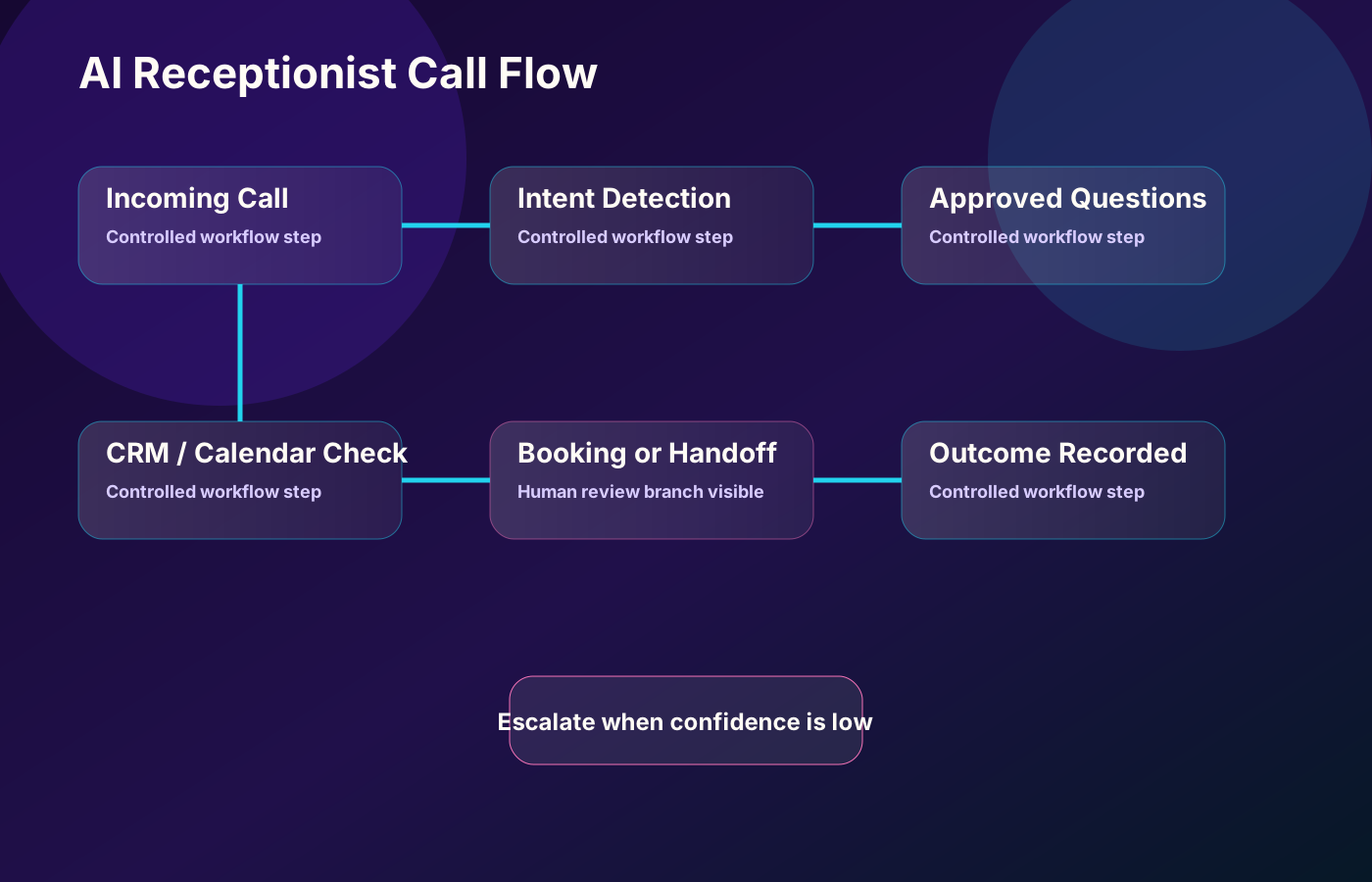
A well-planned call normally moves through six stages.
1. The Call Enters the Business Phone System
The AI receptionist may answer every inbound call, only answer after a set number of rings or provide overflow and after-hours coverage.
2. The Caller Explains the Request
Speech recognition converts the caller's words into text or structured intent. The system identifies whether the call concerns a new lead, existing customer, appointment, support request, billing question or another approved category.
3. The System Follows a Controlled Conversation Path
The voice agent asks relevant questions and uses only approved business information. It should not ask for information that is unnecessary for the requested service.
4. Connected Tools Are Checked
Depending on the workflow, the system may check calendar availability, find a customer record, create a lead, retrieve a service-area rule or send a verification message.
Access should follow the principle of least privilege. A receptionist that only needs to create appointments should not automatically receive broad access to financial, medical or confidential records.
5. The Call Is Resolved or Escalated
Routine calls may end with a confirmed booking or clear next step. Complex, sensitive or urgent calls should be transferred or assigned to a human.
6. The Outcome Is Recorded
The workflow saves useful operational data such as call category, source, booking status, transfer result, follow-up owner and consent status where applicable.
This final stage makes the system measurable. Without reliable records, a business may know that the phone was answered but not whether the call produced a qualified opportunity.
Benefits of an AI Receptionist for Small Businesses
Faster Response to New Inquiries
Speed matters when customers are comparing several providers. An AI answering service for small business can capture the inquiry immediately instead of relying on voicemail or delayed callbacks.
Better After-Hours Coverage
Many customers search, call and book outside standard office hours. A receptionist can collect the request, answer approved questions and offer a suitable next step without pretending that the full team is available.
More Consistent Lead Information
Human notes can vary from one call to another. A structured voice workflow can ask the same essential qualification questions and store the answers in consistent fields.
Reduced Front-Desk Interruption
Routine calls about timing, location, appointment availability and common service questions can interrupt higher-value work. Automating these calls can give staff more time for customers who need human attention.
Direct Connection to Business Systems
A useful AI receptionist is not only a voice. It can connect calls with calendars, CRM stages, owner notifications, follow-up reminders and reporting.
Easier Scaling During Busy Periods
A small team may struggle when several calls arrive at once. A voice automation system can handle multiple conversations, although call concurrency and usage limits depend on the selected provider and infrastructure.
Clearer Follow-Up Accountability
Every qualified call should have a next owner. Automated summaries and tasks can reduce the chance that an inquiry remains hidden in a voicemail inbox.
AI Receptionist vs Human Receptionist
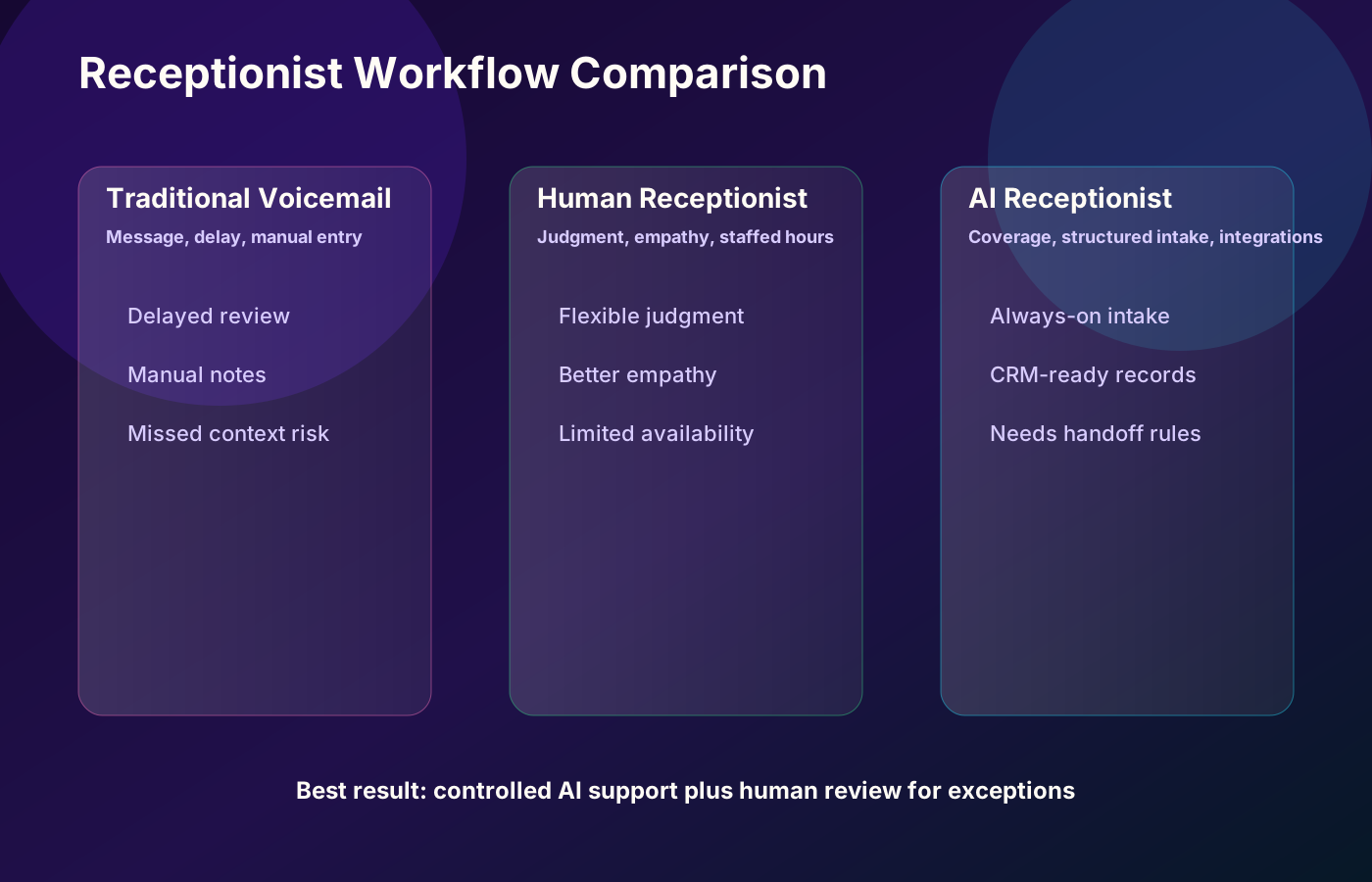
An AI system and a human receptionist have different strengths. The correct choice is often a hybrid workflow rather than a complete replacement.
| Area | AI Receptionist | Human Receptionist |
|---|---|---|
| Availability | Can provide continuous or overflow coverage | Usually limited to staffed hours |
| Repetitive questions | Handles approved questions consistently | Handles them naturally but uses staff time |
| Appointment booking | Can check connected availability instantly | Can handle complex exceptions more flexibly |
| Emotional understanding | Limited and dependent on model quality | Better judgment, empathy and nuance |
| Complex situations | Should escalate | Can investigate and improvise |
| Record creation | Can create structured notes automatically | Quality depends on process and workload |
| Cost model | Usually subscription, usage or managed-service based | Salary, benefits, management and coverage costs |
| Accountability | Requires workflow ownership and monitoring | Requires training, supervision and procedures |
AI is strongest at predictable, repeatable tasks. Humans remain essential when a caller is distressed, the situation is unusual, a policy exception is needed or the business must make a judgment.
How Much Does an AI Receptionist Cost in 2026?
The cost of an AI receptionist depends on call volume, call length, languages, integrations, booking requirements, support level and whether the system is an off-the-shelf product or a custom managed implementation.
Public plans in 2026 commonly fall into three broad categories:
Entry-Level Tools
Basic plans may start in the tens of dollars per month. They often include limited minutes, calls or features. These can suit a solo operator with a simple call script and low volume.
Feature-Rich Small-Business Platforms
Plans with calendar booking, call routing, integrations, multiple workflows and higher usage commonly cost approximately $100 to $300 or more per month. Overage charges may apply.
Human-Hybrid or Custom Managed Systems
Systems that include human agents, custom integrations, advanced reporting, multiple locations, complex qualification or implementation support may cost substantially more. Custom projects are usually scoped according to requirements rather than sold through one fixed monthly price.
Do not compare providers by the headline monthly fee alone. Review:
- Included minutes or calls
- Per-minute and overage charges
- Simultaneous call capacity
- Setup or onboarding fees
- Calendar and CRM integrations
- Number of phone numbers or locations
- Languages and voice options
- Call recording and storage controls
- Support response times
- Custom workflow limitations
- Data export and cancellation terms
Pricing changes frequently. Confirm the provider's current terms before making a decision.
Which Small Businesses Can Use an AI Receptionist?
Home-Service Businesses
Plumbers, electricians, pool-service providers, HVAC companies, cleaners, landscapers and contractors can use an AI receptionist to capture job location, service type, urgency and preferred appointment time.
Emergency language must be routed carefully. The system should never promise response times that the field team has not approved.
Clinics and Aesthetic Practices
A clinic can use voice automation for basic appointment requests, opening hours and general service information.
Medical advice, diagnosis, urgent symptoms and protected information require strict safeguards and human escalation. The workflow must be designed around the applicable privacy and professional requirements.
Salons, Spas and Beauty Businesses
The receptionist can handle service selection, preferred staff member, appointment availability, cancellation policy and reminders.
Real Estate Teams
An AI voice agent can collect property interest, preferred area, budget range, buying or renting status and viewing availability before routing the lead to the appropriate agent.
Consultants, Coaches and Agencies
The system can identify project type, business stage, timeline, current tools and the purpose of a strategy call. Low-fit requests can receive a helpful next step without filling the calendar with unclear meetings.
Professional Offices
Accounting firms, legal practices and similar offices may use AI for basic routing and appointment intake. Confidential, regulated or advice-seeking conversations should be transferred to qualified staff.
Features to Look For
A polished voice is not enough. Evaluate the operational controls behind the conversation.
Natural but Controlled Conversation
The system should understand normal speech while remaining within a reviewed scope. Test interruptions, unclear answers, background noise and callers who change topics.
Human Handoff
The receptionist needs clear rules for transfers, callbacks and urgent cases. Test what happens when the intended person does not answer.
Calendar Integration
The system should respect availability, time zones, appointment types, buffers, cancellation rules and existing bookings.
CRM or Lead-System Integration
Useful fields may include caller name, contact details, service interest, location, urgency, source, qualification status, call summary and follow-up owner.
Knowledge-Base Controls
Business information should be easy to review and update. Old pricing, opening hours or service areas can quickly create poor customer experiences.
Reporting and Call Review
A business should be able to review outcomes, failed calls, transfers, booking accuracy and reasons for escalation.
Privacy and Security Settings
Review data collection, retention, recording, access permissions, subprocessors and deletion options. Obtain appropriate professional or legal guidance for regulated use cases.
Multilingual Support
Do not rely on a language label alone. Test real callers, local accents, mixed-language conversations, names, addresses and industry terminology.
How to Set Up an AI Receptionist
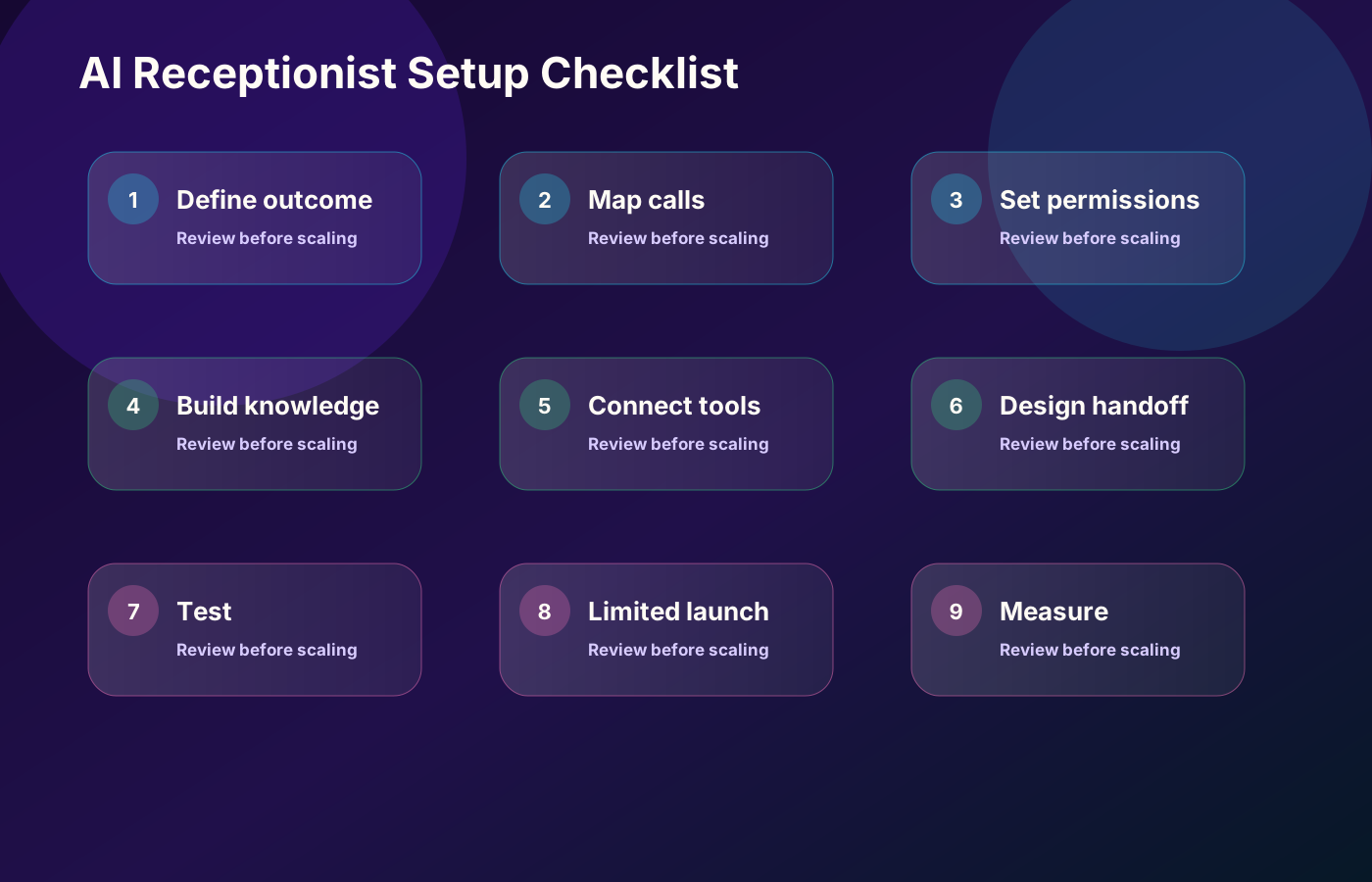
Step 1: Define the Business Outcome
Choose a measurable goal such as reducing missed calls, increasing booked consultations or improving after-hours lead capture.
"Use AI for calls" is not a sufficient implementation objective.
Step 2: Map Existing Call Types
Review recent calls and group them into categories:
- New inquiry
- Existing customer
- Appointment request
- Reschedule or cancellation
- Support issue
- Billing or account question
- Supplier or recruitment call
- Spam or wrong number
- Urgent escalation
This map determines the conversation paths.
Step 3: Decide What the System May and May Not Do
Create an explicit permission list. For example:
Allowed: explain opening hours, collect lead details, book approved appointment types and transfer calls.
Not allowed: negotiate custom prices, provide professional advice, promise emergency attendance or modify sensitive account information.
Step 4: Prepare the Knowledge Base
Use reviewed, current information. Write direct answers for common questions and define what the receptionist should say when the answer is unknown.
Step 5: Connect the Minimum Necessary Tools
Start with only the systems required for the first workflow, such as a phone number, calendar and CRM. Add complexity after the basic path is reliable.
Step 6: Build Handoff and Failure Paths
Plan for unclear speech, failed integrations, unavailable staff, duplicate contacts, calendar errors and callers who ask for a human.
Step 7: Test Realistic Conversations
Test easy calls and difficult calls. Include background noise, interruptions, strong accents, incomplete answers, angry callers and unexpected questions.
Step 8: Launch in a Limited Mode
Begin with after-hours coverage, overflow calls or one appointment type. Review transcripts and outcomes before expanding the scope.
Step 9: Measure and Improve
Treat the AI receptionist as an operational system that requires ownership, review and updates.
Example AI Receptionist Call Flow
Consider a home-service company receiving an after-hours call.
Receptionist: "Thank you for calling. I can help with a new service request, an existing appointment or a message for the team. What do you need help with?"
Caller: "My air conditioner stopped cooling."
Receptionist: "I can collect the details for the service team. What city is the property in?"
The system checks whether the location is within the service area.
Receptionist: "Is the system completely off, or is it running without cooling?"
The answer is stored as a qualification field.
Receptionist: "I can request the next available appointment. This call does not confirm emergency service. Would you like to provide your preferred time?"
The system collects the caller's details, creates a lead, sends an owner alert and explains when the team will respond.
This flow is useful because it answers the call and captures context without making an unsupported promise.
Common Mistakes to Avoid
Allowing the AI to Answer Everything
A broad instruction such as "help the customer with any question" creates risk. Use defined intents, approved information and escalation rules.
Hiding That the Caller Is Speaking With AI
A business should clearly and appropriately identify the automated assistant. Do not design the voice to deliberately mislead callers into believing it is a specific human employee.
Automating Without Human Ownership
Someone must own knowledge updates, failed calls, integration errors and quality review.
Ignoring Failed Transfers
A transfer is not successful merely because the system attempted it. Decide what happens when the person does not answer.
Collecting Too Much Data
Only collect information needed for the call's purpose. Sensitive data creates additional responsibility and risk.
Using One Script for Every Caller
A new lead, existing customer and urgent caller require different paths.
Measuring Calls Instead of Outcomes
A large number of answered calls does not automatically mean the system is useful. Measure qualified inquiries, completed bookings, successful handoffs and follow-up completion.
Metrics to Track
A practical dashboard can include:
- Total inbound calls
- Answered-call rate
- After-hours calls
- New-lead calls
- Qualified leads
- Appointments requested
- Appointments confirmed
- Successful human transfers
- Failed transfers
- Calls requiring manual review
- Average call duration
- Follow-up response time
- Incorrect or incomplete records
- Caller complaints or opt-outs
- Conversion from qualified call to booked or completed service
Separate technical performance from business performance. A call can be handled without errors while still producing a poor customer outcome.
Is an AI Receptionist Right for Your Business?
An AI receptionist may be a strong fit when:
- Your team regularly misses calls.
- Customers call outside staffed hours.
- Many calls involve repeatable questions.
- Appointment booking follows clear rules.
- New leads need faster qualification.
- Call information must enter a CRM or workflow.
- Staff need overflow coverage during busy periods.
It may not be the right first investment when:
- Almost every call requires expert judgment.
- The business has no clear service information or booking process.
- Sensitive calls cannot be safely scoped.
- Nobody can monitor and maintain the system.
- Call volume is too low to justify the setup.
- The underlying customer-service process is unclear.
Automation works best when it improves a defined process. It does not repair a process that nobody owns.
How CurrentReach AI Can Help
CurrentReach AI helps service businesses and growing teams design practical automation systems around lead capture, qualification, appointment requests, CRM routing, notifications and human review.
An AI receptionist project may include:
- Call-type and workflow mapping
- Conversation-scope planning
- Lead qualification fields
- Calendar and CRM integration
- API and webhook connections
- Owner notifications
- Human handoff rules
- Call outcome reporting
- Testing and failure-path review
- Documentation for ongoing updates
The objective is not to automate every conversation. It is to create a controlled system that answers more opportunities, records useful context and sends the right calls to the right person.
Explore AI automation services or request a free strategy call to discuss your call-handling workflow.
Frequently Asked Questions
Can an AI receptionist answer calls 24/7?
Yes. It can provide continuous, after-hours or overflow coverage, subject to the selected phone platform, usage limits and system availability.
Can an AI receptionist book appointments?
Yes. When connected to a supported calendar or booking tool, it can offer approved time slots, create appointments and send confirmations. Complex scheduling exceptions may still require human review.
Can it transfer calls to a real person?
Yes. A properly configured system can transfer calls based on intent, urgency, customer type or team responsibility. A fallback path is required when the person does not answer.
Will callers know they are speaking with AI?
The automated assistant should identify itself clearly and appropriately. Businesses should avoid misleading callers about whether they are speaking with a person.
Can an AI receptionist connect to a CRM?
Yes. It can create or update lead records through native integrations, APIs, webhooks or automation platforms such as n8n, depending on the tools being used.
Does an AI receptionist replace a human receptionist?
Not in every situation. AI is well suited to repetitive intake, booking and routing. Humans remain important for empathy, exceptions, complaints, sensitive information and decisions requiring judgment.
How long does setup take?
A basic system can be configured faster than a custom multi-location workflow. The timeline depends on call paths, integrations, testing, approvals, languages and security requirements.
What happens when the AI does not understand the caller?
The workflow should ask the caller to repeat or clarify, offer an alternate path, take a message or transfer the call. Repeated failures should be reviewed and used to improve the system.
Final Takeaway
An AI receptionist for small business can provide more than automated call answering. When it is connected to the right workflow, it can capture leads, schedule appointments, route calls, create records and improve follow-up visibility.
The quality of the result depends on scope, knowledge accuracy, integrations, human handoff and ongoing review. Start with one clear business outcome, automate the predictable parts and keep people responsible for the conversations that require judgment.
Ready to improve how your business handles incoming calls? Request a free strategy call with CurrentReach AI.
Practical checklist
- Define call outcomes
- Map common caller intents
- Set permissions
- Build approved knowledge
- Connect calendar and CRM
- Design human handoff
- Test edge cases
- Launch with monitoring
- Measure call outcomes
References and further reading
Related implementation path
Image sources
- ai-receptionist-for-small-business-cover.svg: Original CurrentReach AI SVG illustration generated from the publishing package brief. License: Owned site visual. No private data present.
- ai-receptionist-call-flow.svg: Original CurrentReach AI SVG illustration generated from the publishing package brief. License: Owned site visual. No private data present.
- ai-receptionist-comparison.svg: Original CurrentReach AI SVG illustration generated from the publishing package brief. License: Owned site visual. No private data present.
- ai-receptionist-setup-checklist.svg: Original CurrentReach AI SVG illustration generated from the publishing package brief. License: Owned site visual. No private data present.
Need help applying this?
Request a Free Strategy Call if your business needs a safer AI receptionist workflow for calls, bookings, lead capture and human handoff.
Related guides
About the author
Tayyiba Suleman is Web Developer and Automation Developer. Articles are reviewed against the Editorial Policy and should be read with the Content Disclaimer.